 ›
PortaPack ›
Use Cases › Marine VHF
›
PortaPack ›
Use Cases › Marine VHF
Marine VHF
Ships calling port, harbour traffic instructions, coastguard — the North Sea from 30 km inland.
- Attach the telescopic antenna, extend to ~48 cm.
- Tune to 156.800 MHz — Channel 16, the international calling and distress channel.
- Mode: NFM. Bandwidth: 16 kHz. Squelch: off.
- LNA: 16 dB · VGA: 16 dB · Amp: OFF.
- Channel 16 is monitored 24/7 by all ships and coastguard. You should hear traffic within a few minutes during business hours.
1What you'll hear
Maritime VHF uses NFM voice on a channel plan from 156–162 MHz. From an inland location within range of the North Sea coast — such as coastal Belgium or the Netherlands — you can expect to hear:
- Channel 16 — Ships calling Zeebrugge Traffic, Coastguard announcements, securité broadcasts for navigational hazards.
- Channel 11/67 — Zeebrugge port traffic, ship movements, pilot requests.
- North Sea traffic — Freighters and tankers on long runs communicating with Belgian coastguard or other vessels.
By international convention, all vessels and coastguard stations maintain watch on Channel 16 at all times. You'll hear periodic safety broadcasts (weather, navigational warnings) and ships calling into port. During busy morning and afternoon arrival windows at Zeebrugge, it's quite active.
2Legal context
Same grey area as airband — honest picture follows.
Passive reception of maritime VHF is technically restricted by Belgian and EU telecommunications law — these communications are not intended for general public consumption. In practice, enforcement against private listeners is essentially nonexistent. Maritime bands have been scanned by enthusiasts worldwide for decades.
The same rules apply as airband: don't record and publish, don't act on what you hear, don't share clips publicly.
Transmitting on Channel 16 or any maritime frequency without a maritime radio licence (GMDSS) is a serious offence. Unlicensed transmissions on the distress channel are treated as potential emergencies and actively tracked. The HackRF is receive-only for this session.
3Antenna choice
Maritime VHF spans 156–162 MHz. Quarter-wave for the band centre (~159 MHz): 7500 ÷ 159 ≈ 47 cm.
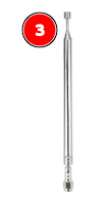
Telescopic antenna — extended to 47 cm
Range: 40 MHz – 6 GHz · Tunable
Extend to ~47 cm. Maritime VHF is line-of-sight; from an inland location you may be just within range of the coast, but you'll catch stronger signals from high-power shore stations (Zeebrugge Traffic, Belgian Coastguard) reliably. Ship-to-ship traffic on the North Sea is more hit-and-miss inland.
If you're ever in Oostende, Zeebrugge, or Blankenberge: the PortaPack at the beach picks up very heavy maritime traffic. Offshore vessels, ferry services, port tug coordination — the coast is a completely different experience from 30 km inland.
4Workflows
From Mayhem home: Receive → Audio. Tune to 156.800 MHz (Channel 16).
Mode: NFM. Bandwidth: 16k or the closest available option. Maritime uses 16 kHz channel bandwidth (same as the wider voice NFM standard).
LNA: 16 dB · VGA: 16 dB · Amp: OFF. Maritime shore stations transmit at high power — you don't need aggressive gain. Raise LNA to 24 only if signals from ships seem weak.
Sit on Channel 16 first to catch any traffic. When you hear a vessel calling Zeebrugge Traffic and getting redirected ("switch to Channel 11"), follow them — dial in 156.550 MHz to hear the working exchange.
Use the encoder wheel to step through the channel plan: 156.050 (Ch1), stepping 50 kHz between channels.
Mayhem Scanner app: scan 156.050–162.025 MHz in 50 kHz steps. Stops on active channels automatically — good for busy periods when multiple channels are in use.
Source: HackRF One → Play. Centre frequency: 159.000 MHz. Sample rate: 10 MHz — wide enough to see the entire maritime band (156–162 MHz) at once.
LNA: 16 dB · VGA: 16 dB · IQ Correction: ON · Amp: OFF.
Radio module: NFM · bandwidth 16000 Hz · squelch off initially. Click directly on a bright signal stripe in the waterfall to tune there.
Channel 16 is at 156.800 MHz — click it or type it in. It's the most active channel; you'll typically see a narrow blue stripe here even when idle (noise floor on an active channel).
5Recommendation
The big advantage of the PortaPack for this session is portability. If you ever get to the coast at Oostende or Zeebrugge, a PortaPack in your pocket on Channel 16 gives you a real-time window into port operations you can't get any other way — ferry departures, tugboat assignments, hazard alerts. Carrying a laptop to the seafront is awkward; a pocket-sized device is natural.
Use SDR++ at home to survey the full band and identify which Belgian channels are active in your area.
6Belgian maritime channels
| Channel | Frequency (ship tx) | Use |
|---|---|---|
| Ch 16 | 156.800 MHz | International distress, safety, calling — always monitor this first |
| Ch 70 | 156.525 MHz | DSC digital selective calling (data bursts — not voice) |
| Ch 11 | 156.550 MHz | Zeebrugge Traffic — vessel traffic service, port approach |
| Ch 71 | 156.575 MHz | Zeebrugge Port working channel |
| Ch 67 | 156.375 MHz | MSI broadcasts — Belgian coastguard safety messages |
| Ch 23 | 161.750 MHz | Oostende Radio — public correspondence |
| Ch 10 | 156.500 MHz | VTMIS Gent — inland vessel traffic on Gent-Terneuzen canal |
Maritime VHF uses a duplex channel plan — ships and shore stations sometimes transmit on different frequencies. The frequencies above are the ship transmit frequencies (what you'll receive from vessels). Shore station transmit frequencies are typically offset; for simplex channels (most working channels), ship and shore use the same frequency.
7What it looks like in the waterfall
Maritime NFM transmissions appear as narrow vertical stripes, about 16 kHz wide — similar to airband AM but slightly wider and in NFM. The characteristic sounds: formal radio procedure, Dutch/English mix, sometimes call signs repeated three times.
8Troubleshooting
I hear static but no voice on Channel 16
Static is good — receiver is working. Maritime VHF has more gaps than airband. Try during 06:00–10:00 and 14:00–18:00 local time — peak port activity windows. Also try Channel 11 (156.550) — Zeebrugge Traffic broadcasts vessel movements regularly even when Ch 16 is quiet.
I hear a rapid digital "burp" sound, not voice
That's DSC — Digital Selective Calling on Channel 70 (156.525 MHz). It's a normal data burst, not voice. The voice call follows on Channel 16 or a working channel. This is expected and indicates the receiver is working correctly on those frequencies.
Signals are clear but voices are hard to understand
Maritime radio procedure uses standardised phrases — if you're not familiar with it, the heavily accented English, call sign repetition, and phonetic alphabet can be hard to follow at first. It gets clearer after a few minutes of exposure. Common phrases: "Zeebrugge Traffic, this is [vessel name] [MMSI], over." The response is: "Vessel calling, this is Zeebrugge Traffic, channel [X]."
Nothing at all — even Channel 16 is silent
1. Confirm NFM mode — not AM, not WFM. Maritime signals demodulated in AM sound like a barely audible hiss.
2. Check antenna is at 47 cm length and connected. Maritime VHF is moderately strong from shore stations but much weaker than FM broadcast.
3. Raise LNA to 24. If you're in a ground-floor flat with no clear sky line toward the coast, try near a window or elevated position.
9Next steps
- Session 07 — 2m amateur repeaters: Very similar setup, same antenna length. NFM on 145 MHz — local ham radio repeaters.
- AIS decoding: Channel 87B (161.975 MHz) and 88B (162.025 MHz) carry AIS — Automatic Identification System data. Similar to ADS-B but for ships: position, name, speed, destination. SatDump and OpenCPN can decode this and show ships on a map. A great follow-up project.
- Visit Zeebrugge: Seriously — the PortaPack at the port entrance is a completely different experience from inland. You'll hear active traffic, tug assignments, and pilot comms that don't reach further inland.